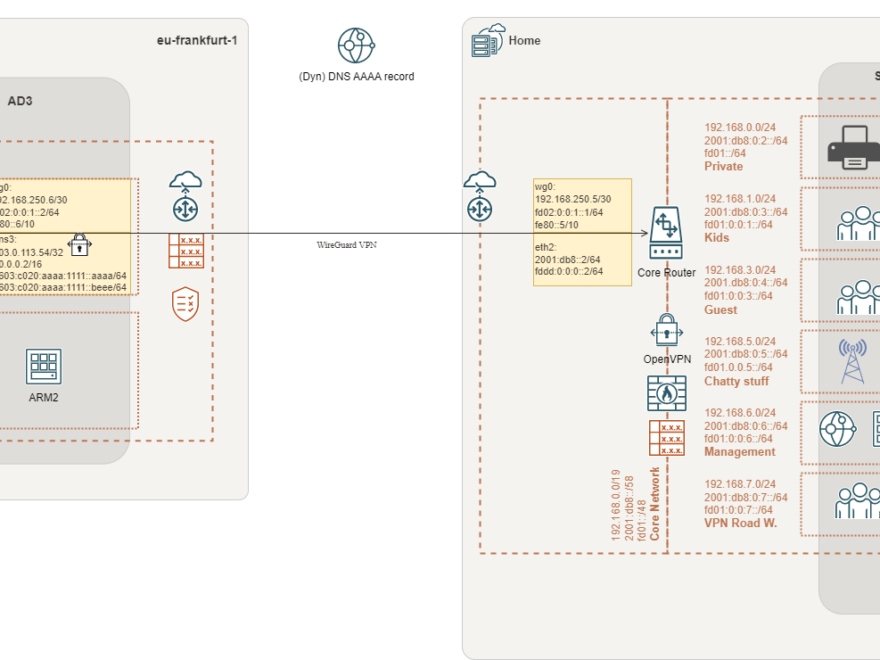
The first part of this blog post series described the preparation of the cloud environment. This included an Ubuntu compute instance as a router. In the second part, we installed and configured WireGuard on the cloud compute instance aka. router.
Following, part I and part II, we will install and configure WireGuard, on our router at home. In my case it’s an EdgeRouter™-X with version 2.0.9.
The installation itself is straightforward and well documented:
Unfortunately, there’re rare examples for IPv6 and OSPF. Therefore, I’ll describe my configuration in addition.
Install WireGuard
Download WireGuard
Check for the latest release of WireGuard in the WireGuard git repository and download it to your router.
As mentioned earlier, in my case it’s an EdgeRouter™-X with version 2.0.9. Please make sure to take the matching version aligned with your needs.
curl -OL https://github.com/WireGuard/wireguard-vyatta-ubnt/releases/download/1.0.20211208-1/e50-v2-v1.0.20211208-v1.0.20210914.deb
Install package
sudo dpkg -i e50-v2-v1.0.20211208-v1.0.20210914.deb
Generate private and public key
wg genkey | tee /config/auth/wg.key | wg pubkey > wg.public
Configure interface
configure
set interfaces wireguard wg0 address 192.168.250.5/30              <transport network IPv4>
set interfaces wireguard wg0 address 'fd02:0:0:1::1/64'      <transport network IPv6>
set interfaces wireguard wg0 address 'fe80::5/64' <link-local>
set interfaces wireguard wg0 description 'Wireguard S2S VPN to OCI'
set interfaces wireguard wg0 listen-port 51822
set interfaces wireguard wg0 mtu 1420
set interfaces wireguard wg0 peer <public key - oci> allowed-ips 0.0.0.0/0
set interfaces wireguard wg0 peer <public key - oci> allowed-ips '::/0'
set interfaces wireguard wg0 peer <public key - oci> endpoint '2603:c020:aaaa:1111::aaaa:51822'
set interfaces wireguard wg0 private-key /config/auth/wg.key
set interfaces wireguard wg0 route-allowed-ips false
commit
save
Set firewall rules
Equivalent to the Network Security Groups and Security Lists in the OCI, you need to take care of access controls. IPv6 concepts are slightly different – you need to think in segments not in addresses!
To handle the situation that public IPv6 (segment) addresses may change randomly (based on prefix delegation), I highly recommend making use of zone-based firewalling.
If you’ve never worked with a zone-based firewall before, it might be tricky to get it. But zone-based firewalling is definitely worth the effort and a big benefit.
A basic zone-based firewall configuration description, for EdgeOS, you may find here: EdgeRouter – Zone-Based Firewall – Ubiquiti Support and Help Center
WireGuard ingress to router
Here’s a basic firewall rule to allow WireGuard ingress to the router.
Naming: wan-local-6
From: wan
To: local (router)
IP version: 6
The rule is intended for all IPv6 traffic from the WAN interface to the router itself. Please adopt as needed! And do not forget to include established and related traffic in your rule, please.
set firewall ipv6-name wan-local-6 rule 110 action accept
set firewall ipv6-name wan-local-6 rule 110 description 'allow Wireguard VPN'
set firewall ipv6-name wan-local-6 rule 110 destination port 51822
set firewall ipv6-name wan-local-6 rule 110 log enable
set firewall ipv6-name wan-local-6 rule 110 protocol udp
Communication through VPN
To allow connections between your zones, you need to create zone policies and attache the related firewall rules.
Please consider that zone-policies for LOCAL, WAN and LAN are given. Here’s just a quick overview what’s required to enable communication over the VPN.
For the communication between zones, you need to take care of ingress and egress. A zone-policy is created for IPv4 and IPv6. In total, four zone-policies are required for a complete configuration between two zones.
#I did create some default firewall rules to make it more easy
#Adopt to your needs! They are just for illustration!!!
default-accept      =  IPv4 everything is allowed
default-accept-6    =  IPv6 everything is allowed
local-out           =  IPv4 everything is allowed, egress router
local-out-6         =  IPv6 everything is allowed, egress router
default-drop-icmp   =  IPv4 drop everything, except ICMP
default-drop-icmp-6 =  IPv6 drop everything, except ICMP
LOCAL
Allow all traffic between the OCI router and your home (core) router:
set zone-policy zone LOCAL from OCI firewall ipv6-name default-accept-6
set zone-policy zone LOCAL from OCI firewall name default-accept

set zone-policy zone OCI from LOCAL firewall ipv6-name local-out-6
set zone-policy zone OCI from LOCAL firewall name local-out
WAN
I decided to let the OCI accessing the internet:
#You may want to drop all traffic from WAN, please adopt
set zone-policy zone OCI from WAN firewall ipv6-name default-drop-icmp-6
set zone-policy zone OCI from WAN firewall name default-drop-icmp

#Maybe you don't want to allow access from the OCI through your network to the Internet, please adopt
set zone-policy zone WAN from OCI firewall ipv6-name default-accept-6
set zone-policy zone WAN from OCI firewall name default-accept
LAN
The OCI is not allowed to access my LAN (ICMP only), but the LAN is allowed to access the OCI:
set zone-policy zone LAN from OCI firewall ipv6-name default-drop-icmp-6
set zone-policy zone LAN from OCI firewall name default-drop-icmp

set zone-policy zone OCI from LAN firewall ipv6-name default-accept-6
set zone-policy zone OCI from LAN firewall name default-accept

#Don't forget to attache the WireGuard interface to your zone-policy
set zone-policy zone OCI interface wg0
Once again! This is just for illustration. Please make sure to adopt to your needs.
Edge router config
Probably you did read my blog post It’s not me, it’s you! … Me? No! It’s you! – black hole/null routing and you’re aware that I do make use of an edge- and core router concept.
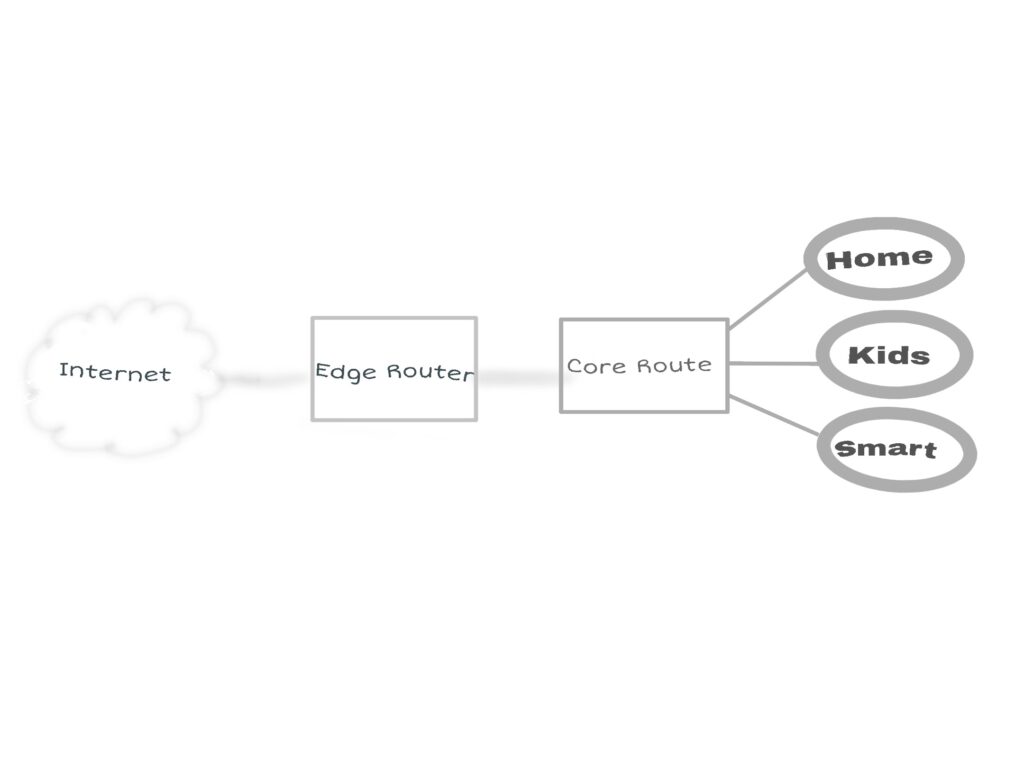
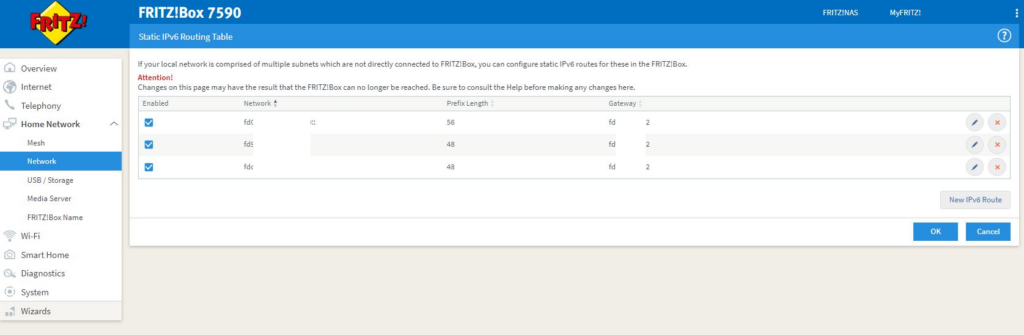
I’ll terminate the VPN on the core router. Therefore, firewall rules and routing need to be configured on the edge router, as well. All rules need to point to the internal core router. Be aware that I make use of IPv6 prefix delegation!
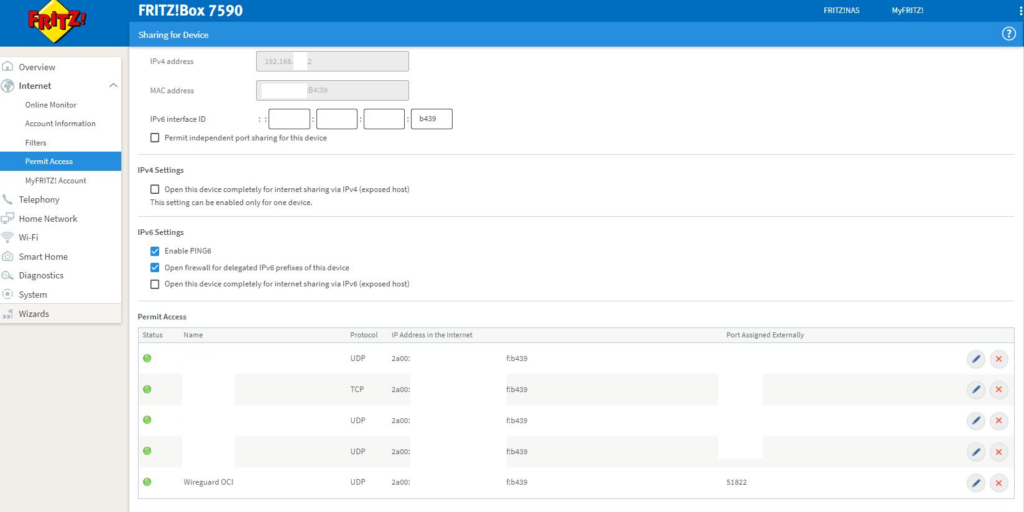
My ISP is the Deutsche Glasfaser. Mostly, the provided CPE/edge router will be a Fritz!Box. Following my example, make sure that you fully understand the impact of the configuration. There’s a risk to make internal devices reachable from the public Internet!
Forward incoming WireGuard traffic
Declare routing to internal IPv4 network segments
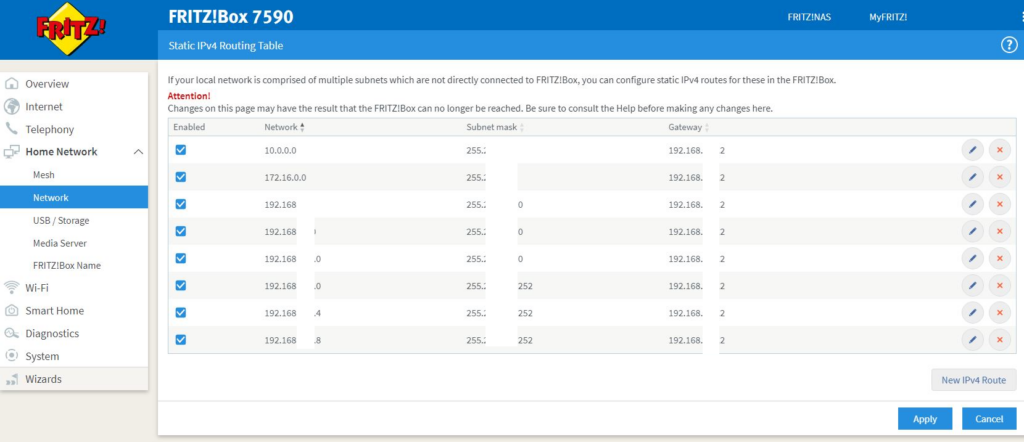
Declare routing to internal IPv6 network segments
Check connection
Time to check your connection
OCI router
root@oci:~# wg
interface: wg0
  public key: xxxxxxxxxxxxxx=
  private key: (hidden)
  listening port: 51822

peer: xxxxxxxxxxxxxx=
  endpoint: [2a00:xxxx:xxxx:xxxx:xxxx:xxxx:xxxx:b439]:51822
  allowed ips: ::/0, 0.0.0.0/0
  latest handshake: 1 minute, 58 seconds ago
  transfer: 177.95 KiB received, 14.14 MiB sent
  persistent keepalive: every 25 seconds
Core router
root@home:~# wg
interface: wg0
public key: XXXXXXXXXXXXXXXXX=
private key: (hidden)
listening port: 51822

peer: XXXXXXXXXXXXXXXX=
endpoint: [2603:c020:aaaa:1111::aaaa]:51822
allowed ips: 0.0.0.0/0, ::/0
latest handshake: 26 seconds ago
transfer: 639.70 KiB received, 178.48 KiB sent
Ping IPv4
root@oci:~# ping 192.168.250.5
PING 192.168.250.5 (192.168.250.5): 56 data bytes
64 bytes from 192.168.250.5: icmp_seq=0 ttl=64 time=6.207 ms
64 bytes from 192.168.250.6: icmp_seq=1 ttl=64 time=6.208 ms
64 bytes from 192.168.250.6: icmp_seq=2 ttl=64 time=7.761 ms
64 bytes from 192.168.250.6: icmp_seq=3 ttl=64 time=7.715 ms
Ping IPv6
root@oci:~# ping6 fd02:0:0:1::1
PING fd02:0:0:1::1 (fd02:0:0:1::1): 56 data bytes
64 bytes from fd02:0:0:1::1: icmp_seq=0 ttl=64 time=8.033 ms
64 bytes from fd02:0:0:1::1: icmp_seq=1 ttl=64 time=6.662 ms
64 bytes from fd02:0:0:1::1: icmp_seq=2 ttl=64 time=6.320 ms
Connected
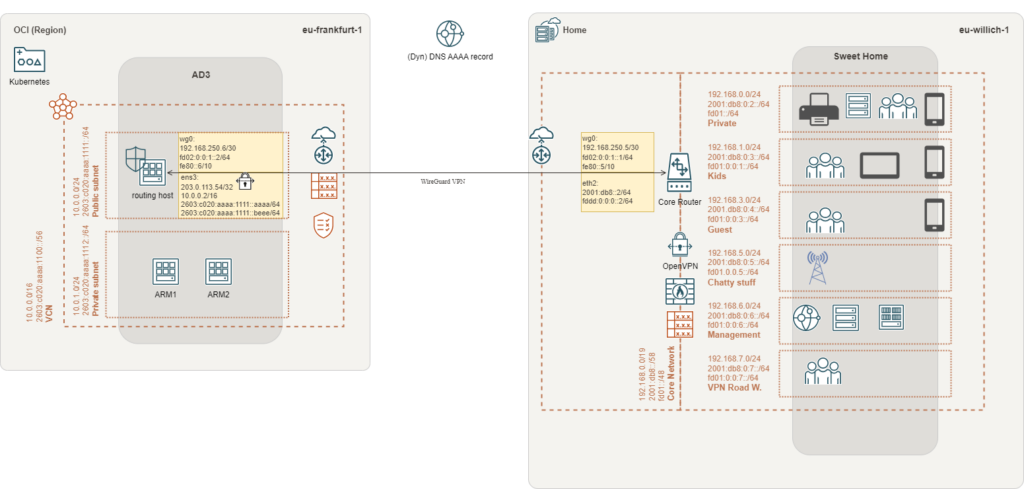
What next?
- The WireGuard site-to-site VPN is up and running!
- The VPN is established over IPv6
- There’s a working connection through the tunnel using IPv4 & IPv6
But unfortunately, we did not configure the routing between networks.
This will be discussed in part IV of this blog post.
- Setup a WireGuard VPN using IPv6 and OSPF – Oracle Cloud Free Tier- part I
- Prepare Oracle Cloud – Free Tier
- Setup a WireGuard VPN using IPv6 and OSPF – Oracle Cloud Free Tier- part II
- Configure WireGuard on the routing host in the Oracle Cloud
- Setup a WireGuard VPN using IPv6 and OSPF – Oracle Cloud Free Tier- part III
- Configure your router @home
- Setup a WireGuard VPN using IPv6 and OSPF – Oracle Cloud Free Tier- part IV
- Configure OSPF/routing